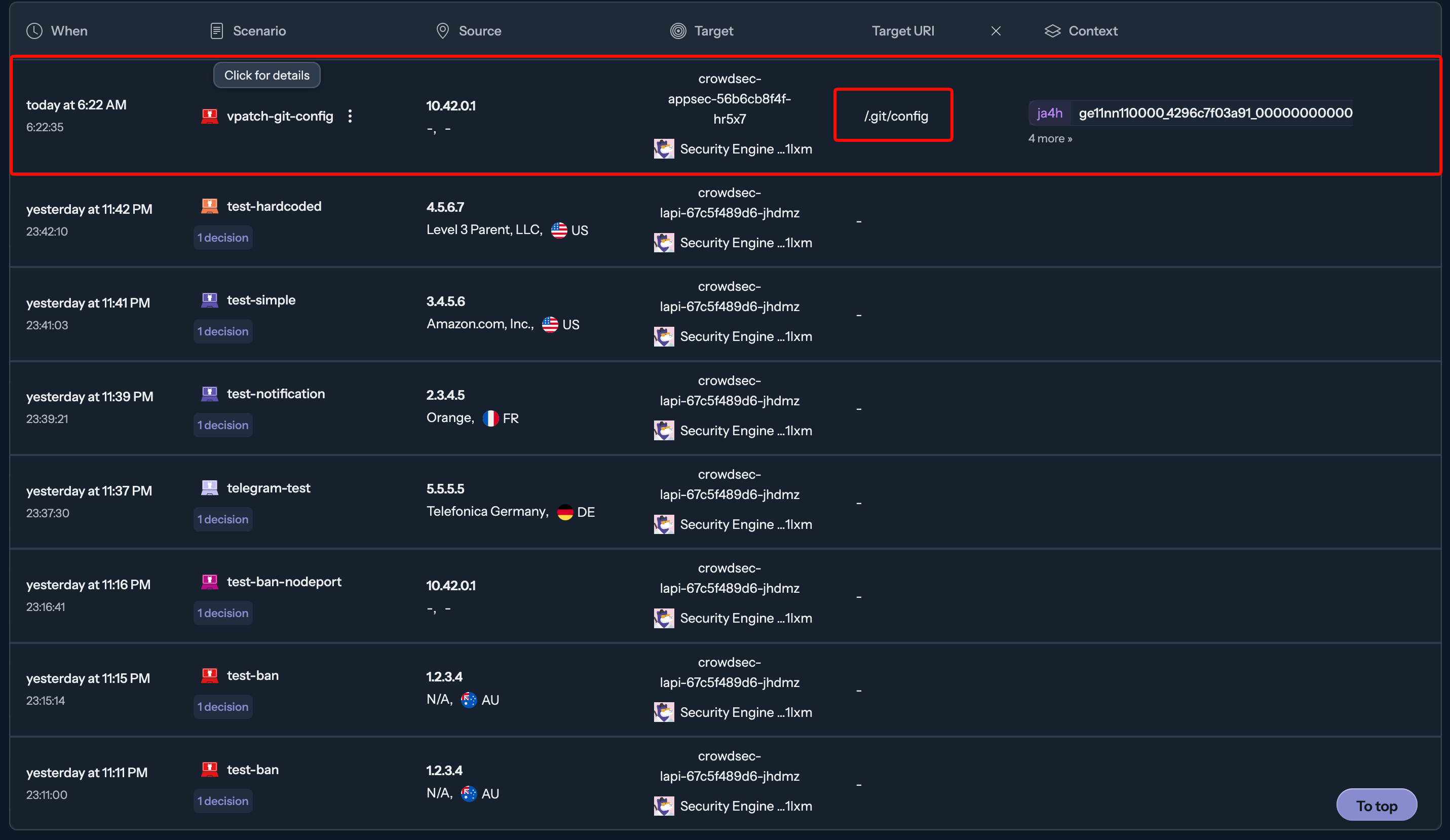
TL;DR 馬上就看到有小王八蛋想壞壞
前言
2025 年 11 月,Kubernetes SIG Network 發布了一篇公告:ingress-nginx 將正式退役。
這個消息讓不少人震驚,但嚴格來說有個細節需要釐清。目前市場上有兩個長得很像的 nginx ingress controller:
- kubernetes/ingress-nginx:由 Kubernetes SIG Network 維護,這次宣布 EOL 的就是它。
- nginx/kubernetes-ingress(又稱 NKS):由 F5 / NGINX Inc. 維護,目前仍持續開發中。
我的 homelab k3s cluster 一直以來用的是 F5 維護的版本,嚴格來說不在這次 EOL 的範圍內。但這個公告還是給了我一個動力,與其繼續追蹤兩個版本之間的差異、擔心哪天又有什麼變化,不如趁這個機會把遷移一次做完。
遷移目標選定 Traefik v3,原因有兩個:
- k3s 內建 Traefik 作為預設 Ingress Controller,1.32 版本後升級為 Traefik v3,搭配
HelmChartConfig管理,和 cluster 的整合度最高。 - 順手引入 CrowdSec 主動防護——長期以來我的服務靠著 Cloudflare proxy 當唯一守門人,但我一直想要在 Ingress 層就能即時判斷並封鎖攻擊者 IP,而不只是依賴前端的 CDN 過濾。
為什麼不選 Cilium Gateway API
在決定遷移到 Traefik 之前,我也閱讀了 Gene 的告別 ingress-nginx:Cilium Gateway API 遷移筆記,評估過 Cilium Gateway API 方案。Cilium 在 CNI 層整合了 Gateway API,理論上能提供更底層、效能更好的流量控制,且完全符合 Kubernetes Gateway API 的標準規範。
但評估之後,我決定放棄這個選項,主要原因是 Cilium 強綁定自家 CNI。
k3s 預設使用 Flannel 作為 CNI,若要換用 Cilium,必須:
- 安裝時就指定
--flannel-backend=none關掉 Flannel - 手動安裝 Cilium 作為替代 CNI
- 重建整個 cluster,因為 CNI 無法在線上無縫切換
對於一個正在運行十幾個服務的 Production homelab 而言,雖然我有做好備份,這個風險太高了。Cilium 本身也有一定的學習曲線和資源消耗(特別是 eBPF 的 kernel 版本要求),對 homelab 這個 single-node k3s 環境來說,ROI 不划算。
相比之下,Traefik 是 k3s 的內建選項,從 Nginx 遷移到它的路徑清晰很多。
Traefik in k3s
Traefik 之所以是 k3s 的預設 Ingress Controller,是因為兩者的設計哲學非常契合:
- lightweight:Traefik 的「閒置」資源消耗遠低於 ingress-nginx,對記憶體和 CPU 都更友善,這對 homelab 的 edge 環境非常重要。
- auto service discovery:Traefik 可以透過 Kubernetes Ingress 資源或自定義的 IngressRoute CRD 動態更新路由,不需要重啟服務。
- Plugin:Traefik v3 支援從 plugin registry 動態載入 middleware plugin,CrowdSec 的 bouncer 就是透過這個機制整合的。
- k3s
HelmChartConfig:k3s 提供了HelmChartConfigCRD,讓我們可以直接透過 yaml 覆蓋 Traefik Helm chart 的 values,而不需要自己管理 Helm release。
在 ingress-nginx 釋出退役消息後,Traefik 官方火速寫了這篇 Why Traefik。
CrowdSec 是什麼

CrowdSec 是一個現代化的開源安全引擎,定位是「協作式的 fail2ban」,傳統的 fail2ban 運作方式是:讀取本機 log → 規則匹配 → 封鎖 IP,且只能保護自己這台機器,規則也需要自己維護。
CrowdSec 的改進在於:
- 所有部署了 CrowdSec 的節點會把偵測到的惡意 IP 回報給 CrowdSec 的 Central API(CAPI),形成一個全球的共享封鎖名單。你不只在保護自己,也在幫助別人。
- CrowdSec 使用「Collection」的概念,每個 Collection 包含針對特定服務的攻擊模式(例如
crowdsecurity/traefik包含 HTTP 掃描、暴力破解等場景)。 - Bouncer 架構:CrowdSec 本身只負責偵測和決策,實際的封鎖動作由 Bouncer 執行。Traefik Plugin 就是一個 Bouncer,它在每個請求進來時查詢 CrowdSec LAPI,確認來源 IP 是否在封鎖名單上。
詳細可以參考官方的這篇文章。
整體架構
%%{init: {'theme':'dark'}}%%
flowchart TD
    Internet["🌐 Internet"]
    CF["Cloudflare Proxy\nX-Forwarded-For:\nreal client IP"]
    NAT["Router NAT\n80→33333 / 443→33334"]
    Traefik["Traefik v3\nNodePort 33333/33334"]

    subgraph CrowdSec_Middleware ["CrowdSec Middleware CRD"]
        LAPI["CrowdSec LAPI :8080\n(IP 封鎖決策 / live mode)"]
        AppSec["CrowdSec AppSec :7422\n(WAF)"]
    end

    Services["k8s Services"]

    Internet --> CF
    CF --> NAT
    NAT --> Traefik
    Traefik --"entryPoints.web\nentryPoints.websecure"--> CrowdSec_Middleware
    CrowdSec_Middleware --> Services
目前 cluster 的部署狀態:
| 元件 | Chart | Namespace |
|---|---|---|
| Traefik | traefik | kube-system |
| CrowdSec | crowdsecurity/crowdsec | crowdsec |
| cert-manager | cert-manager | cert-manager |
CrowdSec 在 crowdsec namespace 下部署了三個 Deployment:
$ kubectl get pods -n crowdsec
NAME                               READY   STATUS    RESTARTS   AGE
crowdsec-agent-bf694dddd-gn48l     1/1     Running   0          15h
crowdsec-appsec-56b6cb8f4f-hr5x7   1/1     Running   0          14h
crowdsec-lapi-694bb65584-whhtw     1/1     Running   0          14h
- LAPI:Local API,負責接收 Agent 的決策、管理封鎖名單、與 CAPI 同步
- Agent:讀取 Traefik Access Log,執行場景匹配
- AppSec:WAF 引擎,負責應用層的攻擊偵測(目前有已知問題,見後述)
遷移步驟
遷移前注意:以下步驟允許停機。請確保已完整備份;若有其他使用者,請事先通知並暫停資料修改(如更新密碼管理器),否則從備份恢復後,遷移期間的變更將全數消失。
ㄧ、停用 ingress-nginx
首先移除原本的 ingress-nginx:
helm uninstall ingress-nginx -n ingress-nginx
kubectl delete namespace ingress-nginx
二、設定 Traefik HelmChartConfig
k3s 中 Traefik 是透過 HelmChartConfig 管理的,建立或修改 /var/lib/rancher/k3s/server/manifests/traefik-config.yaml(或使用 kubectl apply):
apiVersion: helm.cattle.io/v1
kind: HelmChartConfig
metadata:
  name: traefik
  namespace: kube-system
spec:
  valuesContent: |-
    logs:
      general:
        level: INFO
      access:
        enabled: true
    # CrowdSec bouncer plugin(從 Traefik Plugin Registry 動態載入)
    experimental:
      plugins:
        crowdsec-bouncer-traefik-plugin:
          moduleName: "github.com/maxlerebourg/crowdsec-bouncer-traefik-plugin"
          version: "v1.4.2"
    ports:
      web:
        # 若需要固定 NodePort(例如 Router NAT 有指定對應 port),在此設定
        # nodePort: 33333
        # 全域套用 CrowdSec Middleware
        http:
          middlewares:
            - "crowdsec-crowdsec@kubernetescrd"
        forwardedHeaders:
          trustedIPs:
            # Cloudflare IP 範圍(用於正確讀取 X-Forwarded-For)
            # 完整列表:https://www.cloudflare.com/en-us/ips/
            - "103.21.244.0/22"
            - "103.22.200.0/22"
            - "173.245.48.0/20"
            # ...
      websecure:
        # nodePort: 32443
        http:
          middlewares:
            - "crowdsec-crowdsec@kubernetescrd"
        forwardedHeaders:
          trustedIPs:
            - "103.21.244.0/22"
            # ...
這裡有個細節值得注意:Middleware 的路徑是 ports.web.http.middlewares,不是 ports.web.middlewares。這個差異在 Traefik v3 (chart v39) 中是會靜默忽略的,稍後的踩坑記錄會詳細說明。
三、部署 CrowdSec
先建立靜態 PV(k3s 環境中偏好使用靜態 PV 而非動態 local-path,確保資料持久性):
apiVersion: v1
kind: PersistentVolume
metadata:
  name: crowdsec-db-pv
spec:
  storageClassName: ""
  capacity:
    storage: 1Gi
  accessModes:
    - ReadWriteOnce
  persistentVolumeReclaimPolicy: Retain
  local:
    path: /opt/crowdsec/db  # 節點上的實際路徑
  nodeAffinity:
    required:
      nodeSelectorTerms:
        - matchExpressions:
            - key: kubernetes.io/hostname
              operator: In
              values:
                - <your-node-name>  # kubectl get nodes 查詢
在節點上建立對應目錄:
# ssh 進入 k3s 節點
mkdir -p /opt/crowdsec/db /opt/crowdsec/config
再用 Helm 安裝 CrowdSec:
helm repo add crowdsecurity https://crowdsecurity.github.io/helm-charts
helm repo update

helm upgrade --install crowdsec crowdsecurity/crowdsec \
  -n crowdsec --create-namespace \
  -f k8s/crowdsec/values.yaml \
  --version 0.23.0
四、建立 Bouncer API Key 並套用 Middleware
CrowdSec LAPI 啟動後,需要手動建立 Traefik Bouncer 的 API Key:
LAPI_POD=$(kubectl get pod -n crowdsec -l type=lapi \
  -o jsonpath='{.items[0].metadata.name}')

# 刪除既有的再重建
kubectl exec -n crowdsec "$LAPI_POD" -- \
  cscli bouncers delete traefik-bouncer 2>/dev/null || true

BOUNCER_API_KEY=$(kubectl exec -n crowdsec "$LAPI_POD" -- \
  cscli bouncers add traefik-bouncer -o raw)

echo "API Key: $BOUNCER_API_KEY"
再把 API Key 存成 Secret,並套用 Middleware CRD:
kubectl create secret generic crowdsec-bouncer-secret \
  -n crowdsec \
  --from-literal=api-key="$BOUNCER_API_KEY" \
  --dry-run=client -o yaml | kubectl apply -f -
Middleware CRD 範本(middleware.yaml):
apiVersion: traefik.io/v1alpha1
kind: Middleware
metadata:
  name: crowdsec
  namespace: crowdsec
spec:
  plugin:
    crowdsec-bouncer-traefik-plugin:
      enabled: true
      logLevel: INFO
      crowdsecMode: live
      crowdsecLapiKey: "${BOUNCER_API_KEY}"
      crowdsecLapiHost: "crowdsec-service.crowdsec.svc.cluster.local:8080"
      crowdsecLapiScheme: http
      crowdsecAppsecEnabled: true
      crowdsecAppsecHost: "crowdsec-appsec-service.crowdsec.svc.cluster.local:7422"
      forwardedHeadersCustomName: X-Forwarded-For
因為 API Key 不應該 commit 到 git,所以透過 envsubst 在 apply 前替換環境變數:
export BOUNCER_API_KEY="..."
envsubst < middleware.yaml | kubectl apply -f -
踩坑記錄
這次遷移過程踩了不少坑,以下是最值得記錄的幾個。
Middleware 路徑寫錯,完全靜默失敗
問題:Middleware CRD 存在,Bouncer 也已在 LAPI 註冊,但 kubectl logs -n kube-system deployment/traefik 中完全看不到任何 CrowdSec 相關的 log,Last API pull 時間也一直是空的。
原因:Traefik v3 (chart v39) 中,全域 Middleware 的正確路徑是:
# 正確
ports:
  web:
    http:
      middlewares:
        - "crowdsec-crowdsec@kubernetescrd"

# 錯誤
ports:
  web:
    middlewares:
      - "crowdsec-crowdsec@kubernetescrd"
ports.web.middlewares 在 Traefik v3 chart 中已經不是有效路徑,但 Helm 不會報錯,流量也不會被攔截,Traefik 就靜靜地把這個設定吃掉了。
這種靜默失敗最難 debug,因為你沒有任何錯誤訊息可以追查。
Middleware 格式是 namespace-name@kubernetescrd
在 Traefik 中,CRD(IngressRoute、Middleware 等)的引用格式是:
<namespace>-<name>@kubernetescrd
所以在 crowdsec namespace 下名叫 crowdsec 的 Middleware,完整引用名稱是:
crowdsec-crowdsec@kubernetescrd
一開始沒注意到 namespace prefix,直接寫 crowdsec@kubernetescrd 導致 Middleware 找不到。
AppSec Collection 需要在 AppSec Pod 中獨立安裝
問題:AppSec Pod 啟動崩潰:
level=fatal msg="crowdsec init: while loading acquisition config:
datasource of type appsec: unable to load appsec_config:
no appsec-config found for crowdsecurity/virtual-patching"
原因:CrowdSec Helm chart 0.23.0 中,agent、appsec、lapi 三個 Pod 各自使用獨立的 emptyDir volume 存放設定。Agent Pod 下載的 Collections 不會共享給 AppSec Pod。
解法:在 values.yaml 的 appsec 段落中額外指定 COLLECTIONS 環境變數:
appsec:
  enabled: true
  env:
    - name: COLLECTIONS
      value: "crowdsecurity/appsec-virtual-patching crowdsecurity/appsec-generic-rules"
  acquisitions:
    - source: appsec
      listen_addr: "0.0.0.0:7422"
      path: /
      appsec_config: crowdsecurity/virtual-patching
      labels:
        type: appsec
Chart 會透過 init container 在 AppSec Pod 啟動前把指定的 Collections 下載好。
crowdsecurity/vaultwarden Collection 不存在
問題:Agent init container 失敗並 crash-loop:
Error: cscli collections install:
can't find 'crowdsecurity/vaultwarden' in collections
這個 Collection 在 CrowdSec Hub 中根本不存在(至少截至 v1.7.7 為止)。Vaultwarden 的暴力破解防護部分被 crowdsecurity/traefik 這個 HTTP 場景 Collection 涵蓋,不需要單獨的 Collection。
移除這個不存在的 Collection 名稱後,Agent 正常啟動。
notification-telegram 在 v1.7.7 Image 中不存在
我想設定 Telegram 通知,在 values.yaml 裡面加上了 notification-telegram 的設定,結果 LAPI 直接 fatal crash:
level=fatal msg="api server init: plugin broker: loading plugin:
binary for plugin telegram_default not found"
CrowdSec v1.7.7 的官方 Docker image 中沒有 notification-telegram 這個 binary。官方的做法是使用 type: http 的 notification plugin 來呼叫 Telegram Bot API,設定方式可以參考官方文件。
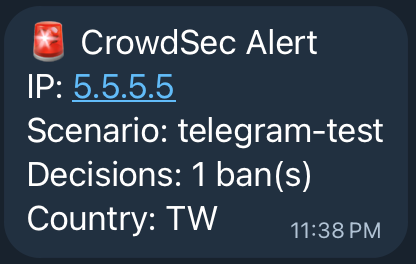
值得一提的是:format 欄位是 Go template,不支援 ${VAR} 環境變數替換(那只對頂層字串欄位如 url 有效),所以 chat_id 只能硬寫或透過 Go template 語法帶入,不能用 ${TELEGRAM_CHAT_ID} 佔位。
AppSec 未實際作用(未解決)
目前整套架構中,IP 封鎖(LAPI + live mode)運作正常,但 AppSec(WAF)部分尚未實際生效。
具體問題是 AppSec Pod 正常運行,Middleware CRD 中 crowdsecAppsecEnabled: true 也已設定,但 Traefik Plugin 的 log 顯示請求進來時沒有觸發 AppSec 查詢。
目前懷疑是 Traefik Plugin 使用 mapstructure 來反序列化 CRD 的設定,boolean 型別欄位(crowdsecAppsecEnabled)可能沒有被正確解析,字串型別欄位(crowdsecLapiHost、crowdsecMode)確認運作正常,但 bool 欄位似乎被忽略了。(此為目前推測,尚未透過 Plugin 原始碼或 issue 追蹤確認。)
這個問題目前還沒有找到解決方法,AppSec Pod 先維持運行,等後續版本的 Plugin 或 Chart 修復後再行驗證。
IP 封鎖的部分完全正常運作,可以用下面的指令測試:
LAPI_POD=$(kubectl get pod -n crowdsec -l type=lapi \
  -o jsonpath='{.items[0].metadata.name}')

# 手動新增封鎖決策
kubectl exec -n crowdsec "$LAPI_POD" -- \
  cscli decisions add --ip "5.5.5.5" --duration 5m --reason "test"

# 確認封鎖名單
kubectl exec -n crowdsec "$LAPI_POD" -- \
  cscli decisions list

# 清除測試封鎖
kubectl exec -n crowdsec "$LAPI_POD" -- \
  cscli decisions delete --ip "5.5.5.5"
寫在最後
從 ingress-nginx 遷移到 Traefik 的過程比我預期的平順,k3s 的 HelmChartConfig 機制讓 Traefik 的設定管理非常直覺。
CrowdSec 的整合稍微複雜一些,主要是 Helm chart 0.23.0 有一些反直覺的設計(各 Pod 的 emptyDir 隔離、非標準 label),但搞清楚之後架構其實很清晰。
目前最大的未解問題是 AppSec 的 bool 欄位反序列化問題,但這不影響核心的 IP 封鎖功能。整合了 CrowdSec 之後,我可以在 LAPI 的 dashboard 看到來自 CAPI 的全球封鎖名單被同步下來,不再只靠 Cloudflare 當唯一的守門人了。
下一步可能會考慮把 CrowdSec 的 decisions 也整合到 Cloudflare 的防火牆規則,讓封鎖在邊緣節點就生效,進一步減少不必要的請求打到 k3s cluster。